BFS Field Survey Heuristic
Scenario
One is out on the field and comes across an <OBJECT> on OpenStreetMap that is lacking details. One chooses to create a survey field note.
At a later date, one processes the survey notes and realizes that one is having trouble georeferencing the details. Thus all the effort becomes useless in the betterment of OpenStreetMap.
BFS field surveying heuristics
BFS field surveying heuristics are a set of schemas for respective categories in the OpenStreetMap ecosystem to create survey field notes such that the error of georeferencing during post-processing stays minimal. Thus reducing the trips required for field surveying.
Each heuristic utilizes one-to-many quick actions1 to reduce the allotted time during field surveying.
<OBJECT> refers to the specific OpenStreetMap object and has a respective heuristic in the upcoming list.
Heuristics
Each heuristic's name is in the form of BFS Field Survey <OBJECT> Heuristic or short <OBJECT> Heuristic. To reduce verbosity the list is only populated with the short names.
- Paths Heuristic
- Steps Heuristic
- (More heuristics to come in the future.)
Reference point
While in the field it is best to have a tracker recording2 the route being taken, alternatively one can memorize the route. The reference point refers to a point, typically, referencing on a path aka as in OpenStreetMap as highway.
NB: There is the chance that the map currently does not provide any path data vel it is imprecise, thus the recommendation of having a tracker running.
Properties
Each field note can have a set of properties <PROPERTY>, which are object independent details. They have the commutative property. To ease post-processing it is best to adhere to the schema
1<OBJECT> <?direction> <?interval>
With the ? denoting as optional.
Direction
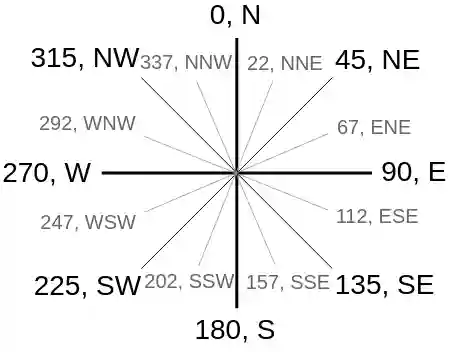
The field note utilizes the direction3 value
1<OBJECT> <direction>
The value may be either a cardinal direction4 (quick) or a degrees (slow) ranging from 0 to 359. (Image source5)
Interval
The interval denotes the start and end of an <OBJECT>. It has the intrinsic characteristic that one will need to denote the direction of movement such as through a tracking app or from memory.
The terminology is alpha and omega for start and end, respectively.
- start:
alphaor shortawritten asa|alpha - end:
omegaor shortowritten aso|omega
1<OBJECT> <interval>
NB: The reason why not to use s|start or e|end is that the short form conflates with the cardinal direction.
Keywords
Each field note can have a set of keywords <KEYWORD>, which are not all commutative.
both: the<OBJECT>occurs on both sides to the reference point.
Further recommendations vel resources
- Setup quick actions in OsmAnd6 to get the full potentials of the BFS field surveying heuristic.
- Activate radius ruler in OsmAnd7.
- Download and import quick actions suggestions8.
References
-
Quick map with OsmAnd guide, BFS Source, ↩︎
-
Track recording apps, OpenStreetMap Wiki (Android), OpenStreetMap Wiki (iOS) ↩︎
-
OpenStreetMap key
direction=*, OpenStreetMap Wiki ↩︎ -
Compass with angles, OpenStreetMap Wiki ↩︎
-
Quick map with OsmAnd guide, BFS Source, ↩︎
-
OsmAnd: activate radius ruler, BFS Source ↩︎
